
AI summary
clauderA small command-line tool I wrote. It keeps Claude Code tokens under names and starts Claude Code with the one you pick. is a small tool I wrote that starts Claude CodeAnthropic's coding assistant that runs in your terminal. It reads your repo, edits files and runs commands. as another account while your own login stays as it is. Two accounts can run side by side.
- clauderA small command-line tool I wrote. It keeps Claude Code tokens under names and starts Claude Code with the one you pick. keeps Claude CodeAnthropic's coding assistant that runs in your terminal. It reads your repo, edits files and runs commands. tokens under names you choose and starts Claude CodeAnthropic's coding assistant that runs in your terminal. It reads your repo, edits files and runs commands. with the account you pick, from a menu or by name.
- It hands the token only to the claude process it starts, through the CLAUDE_CODE_OAUTH_TOKEN environment variableA named value a program reads from its surroundings when it starts. A variable set for one command reaches only that command and the programs it starts., so your own login is never touched.
- Each account gets its own bypass switch, and the whole tool is one Node.js file with no dependencies.
clauderA small command-line tool I wrote. It keeps Claude Code tokens under names and starts Claude Code with the one you pick. starts Claude CodeAnthropic's coding assistant that runs in your terminal. It reads your repo, edits files and runs commands. as a different account without logging you out of your own. I wrote it for people with more than one Claude account, say a work Team plan next to a personal Pro.
Claude CodeAnthropic's coding assistant that runs in your terminal. It reads your repo, edits files and runs commands. keeps one login per machine. The usual way to switch is /logout, then a new browser login, and you can’t have both accounts open at the same time. With clauderA small command-line tool I wrote. It keeps Claude Code tokens under names and starts Claude Code with the one you pick., you pick the account when you start claude. One terminal can run as your work account while another runs as your own.
Installing and using it
You need Node.js 18 or newer. clauderA small command-line tool I wrote. It keeps Claude Code tokens under names and starts Claude Code with the one you pick. is one file with no dependencies, so npm link downloads nothing. It runs on Windows, macOS and Linux.
git clone https://github.com/fatih255/clauder
cd clauder
npm link
Then add an account under a name and start claude with it:
clauder add work        # paste the token, add an optional note
clauder work            # start claude as "work"
clauder work -c         # anything after the name goes to claude
clauder me              # your own login, no token
clauder                 # arrow-key menu of all accounts
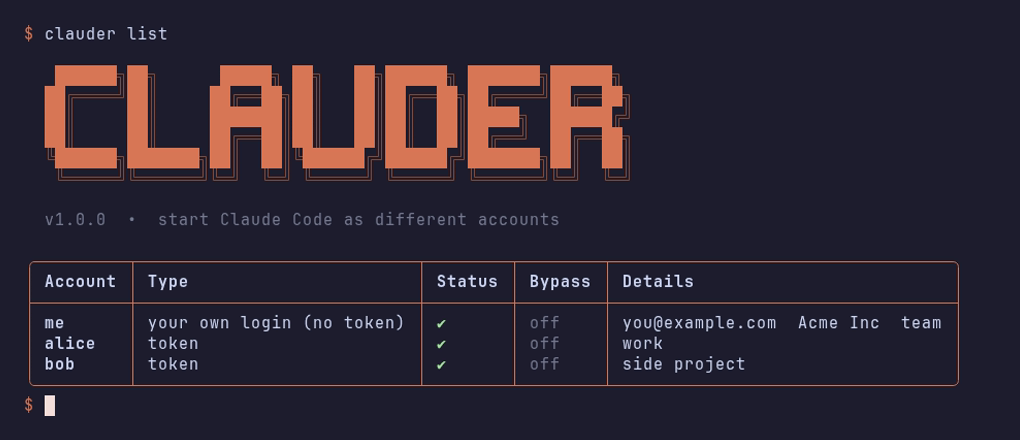
clauder list            # accounts and whether each one is logged in
The token comes from the account itself. Whoever owns the second account runs this and signs in with that account in the browser:
claude setup-tokenIt prints a token that starts with sk-ant-oat01-. The token is valid for one year and works with a Pro, Max, Ultra, Team or Enterprise plan. setup-token doesn’t save it anywhere, so paste it into clauder add right away.
How it keeps your login untouched
Claude CodeAnthropic's coding assistant that runs in your terminal. It reads your repo, edits files and runs commands. accepts a token from the CLAUDE_CODE_OAUTH_TOKEN environment variableA named value a program reads from its surroundings when it starts. A variable set for one command reaches only that command and the programs it starts., and that token wins over the saved login. clauderA small command-line tool I wrote. It keeps Claude Code tokens under names and starts Claude Code with the one you pick. sets the variable only for the claude process it starts. Nothing is written to Claude CodeAnthropic's coding assistant that runs in your terminal. It reads your repo, edits files and runs commands.’s own files, so every other terminal keeps your login.
You can check this with claude auth status --json. Its authMethod field is claude.ai for the saved login and oauth_token for a token from the variable. I ran it on my machine with a made-up token:
claude auth status --json | grep authMethod"authMethod": "claude.ai",My saved login.
CLAUDE_CODE_OAUTH_TOKEN=sk-ant-oat01-fake claude auth status --json | grep -E 'loggedIn|authMethod'"loggedIn": true, "authMethod": "oauth_token",This one process uses the token.
claude auth status --json | grep authMethod"authMethod": "claude.ai",The next command is back on my login. Nothing was overwritten.
CLAUDE_CODE_OAUTH_TOKEN=sk-ant-oat01-fake claude -p "hi"Failed to authenticate. API Error: 401 OAuth access token is invalid.The first real request is where a bad token fails.
The second command says loggedIn: true even though the token is fake, because auth status doesn’t ask the server. That’s why clauderA small command-line tool I wrote. It keeps Claude Code tokens under names and starts Claude Code with the one you pick. doesn’t check tokens either. An expired or revoked one shows up as a login error when claude starts, and running clauder add work again replaces it.
Other account switchers, such as claude-swap, swap the saved login that Claude CodeAnthropic's coding assistant that runs in your terminal. It reads your repo, edits files and runs commands. sees. clauderA small command-line tool I wrote. It keeps Claude Code tokens under names and starts Claude Code with the one you pick. never moves or replaces it.
Bypass permissions per account
Each account has its own bypass switch, off by default. When it’s on, clauderA small command-line tool I wrote. It keeps Claude Code tokens under names and starts Claude Code with the one you pick. starts claude with --dangerously-skip-permissions, so Claude CodeAnthropic's coding assistant that runs in your terminal. It reads your repo, edits files and runs commands. runs tools and edits files without asking first. The menu marks those accounts with a yellow ⚠ bypass tag.
clauder bypass             # checkbox list of all accounts
clauder bypass work on
clauder bypass me off      # works for your own login too
If you pass a permission mode yourself, for example clauder work --permission-mode plan, clauderA small command-line tool I wrote. It keeps Claude Code tokens under names and starts Claude Code with the one you pick. leaves the flag off for that run.
What to know before you use it
A setup-token token can only make model requests, so features that need your claude.ai account, such as Remote Control and claude.ai connectors, don’t work with it. MCP servers you set up locally do.
The tokens sit in plain text in ~/.clauder/accounts.json. On macOS and Linux only you can read that file. A token gives full use of its owner’s subscription, so keep it to your own accounts, or ones you’re allowed to use.